 agentview
Terminal dashboard for coding agents
All your coding agents.
One terminal.
See which one needs you. Jump in, jump back out. Works with 18 coding harnesses and plain shell jobs.
$
curl -fsSL https://raw.githubusercontent.com/moritzWa/agentview/main/install.sh | bash
Why
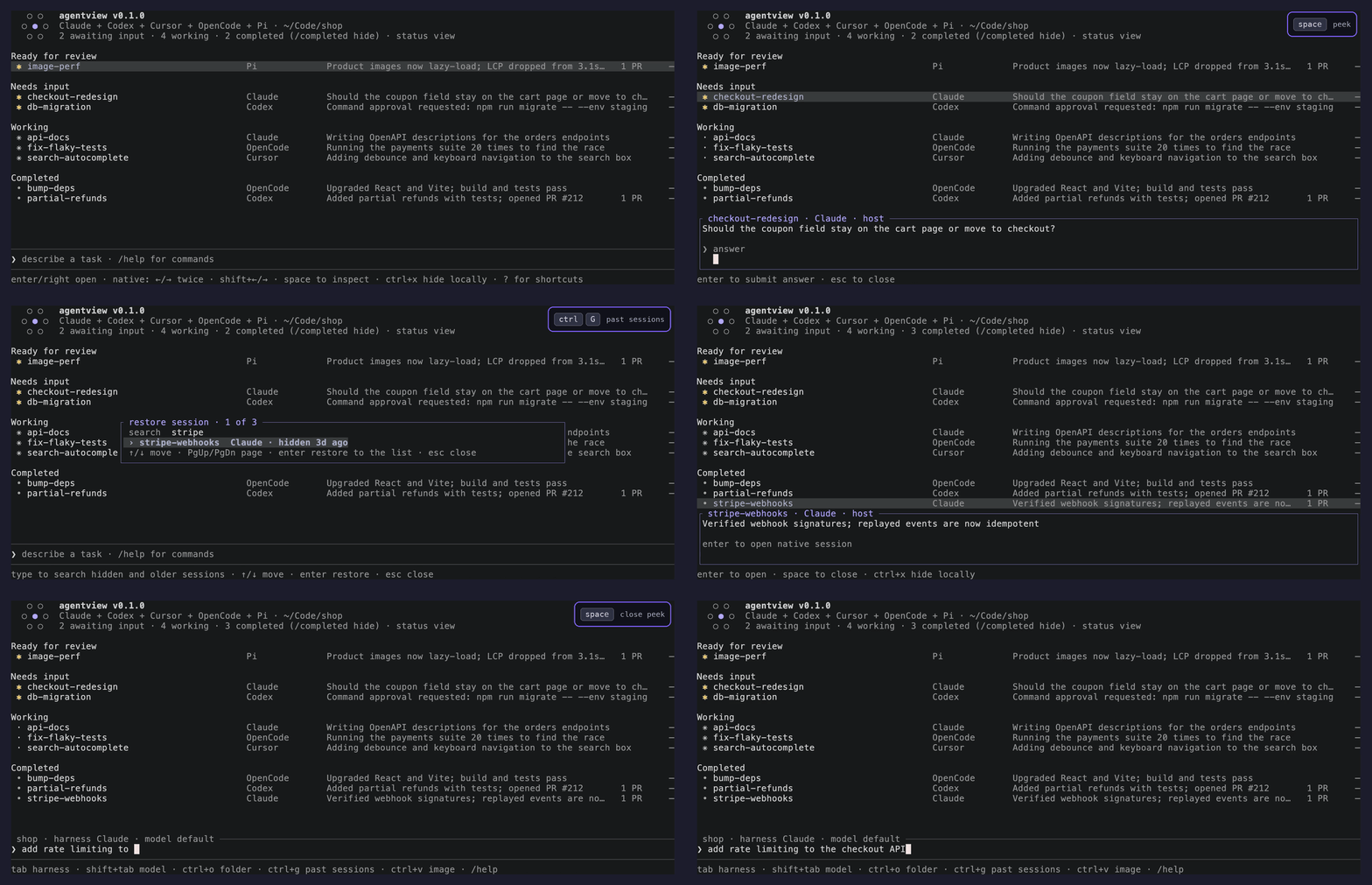
Five agents means five terminal tabs, and the one waiting on you is in the tab you aren't looking at. agentview lists every session from every harness in one place, with the ones that need you on top. Selecting a row opens the harness's own interface.
Features
Grouped by statusWaiting for input, working, completed. The harness is shown on every row.
Jump in and back outOpen a native session while its work keeps running, then return to the list.
Bring back any past sessionCtrl+G searches older sessions by name, harness, folder, or ID. No
cd or --resume.Start in any folder
/cd or Ctrl+O. Multi-line tasks, pastes, and clipboard images stay one draft.Migrate a conversationMove a session to another harness with Ctrl+M, via session-migrate.
Pause what you're waiting onCtrl+T moves a session into a collapsed Paused group.
Harnesses
 Claude Code
 OpenAI Codex
 Pi
Pi OpenCode
 Cursor
 GitHub Copilot
 Antigravity
 Mistral Vibe
 Muse Code
 Qwen Code
 Kimi Code
 Oh My Pi
 Grok
Grok Kilo Code
 OpenHands
 Hermes Agent
 MastraCode
 Devin
Devin Terminal
Keys
| Move through sessions | ↑ ↓ |
| Open the selected session | Enter |
| Return to agentview | Shift+← |
| Bring back a past session | Ctrl+G |
| Pick a harness / model | Tab Shift+Tab |
| Show every shortcut | ? |